

In the world of SEO, not all backlinks are created equal. Two terms you’ll often hear are dofollow and nofollow links, and while they look similar on the surface, their impact on search engine optimization is very different. The core distinction lies in how they communicate with search engines: one passes authority and contributes to rankings, while the other restricts that flow. Understanding the difference between dofollow and nofollow links is essential for SEO professionals, content creators, and webmasters who want to manage their backlink strategies effectively. Without this knowledge, you risk weakening your site’s authority or misusing valuable opportunities to build a strong backlink profile.
What is a Dofollow Backlink?
A dofollow backlink is simply a standard hyperlink that allows search engines to follow it and transfer authority from one site to another. When an authoritative website links to your page with a dofollow link, it passes along what SEO professionals often call “link juice.” This “juice” strengthens your Domain Authority or Domain Rating, and it improves your chances of ranking higher in search engine results for targeted keywords.
It’s important to remember that all links are dofollow by default. There is no rel=”dofollow” attribute in HTML. If you place a regular <a href=””> link on your website without adding any special tags, that link is automatically treated as dofollow by search engines. In essence, dofollow backlinks act as endorsements, signaling to Google and other search engines that your content is trustworthy, relevant, and worth ranking.
What is a Nofollow Backlink?
On the other hand, a nofollow backlink contains the attribute rel=”nofollow”. This tells search engines not to transfer authority or PageRank through that link. Originally introduced by Google in 2005, the nofollow attribute was designed to fight comment spam. At the time, blogs and forums were being flooded with spammy links purely for SEO benefits, so nofollow helped curb abuse.
For years, search engines treated nofollow as a strict directive: they wouldn’t crawl or pass PageRank through those links. But in 2019, Google updated its stance and began treating nofollow as a “hint” rather than a rule. This means that while Google may still choose not to transfer ranking signals, it can decide to crawl and index a nofollow link if it finds it useful. The update made nofollow links more flexible and highlighted that they can still play a role in broader SEO strategies.
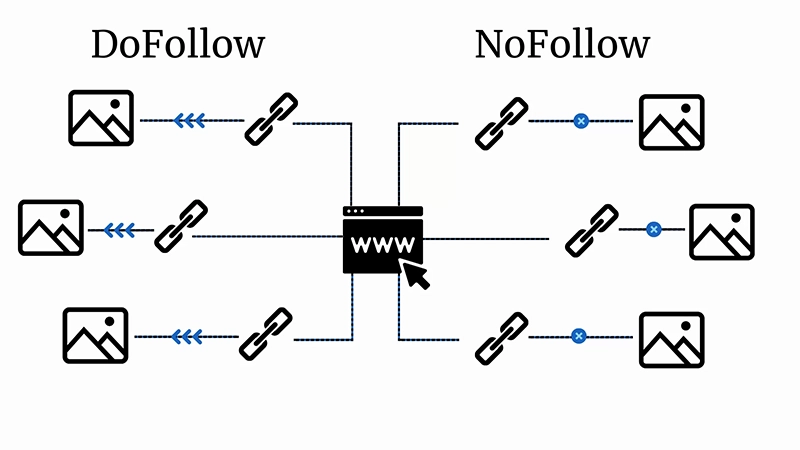
The Core Distinction: PageRank, Crawling, and Indexing
The main difference between dofollow and nofollow links lies in their relationship with PageRank. Dofollow links pass PageRank from one page to another, contributing directly to improved search visibility. They also encourage crawling and indexing, helping search engines discover new pages quickly. Nofollow links, by contrast, typically do not pass PageRank and were traditionally excluded from crawling. With Google’s hint-based approach, nofollow links might still be crawled or indexed, but their SEO value remains limited compared to dofollow.
When to Use Nofollow Links (and the New Attributes)
There are strategic moments when nofollow is the smarter choice.
- Irrelevant, low-quality, or spammy pages: You should avoid passing authority to sites that are untrustworthy, irrelevant, or spammy. Using nofollow here prevents Google from associating your site with low-quality sources.
- Duplicated or auto-generated pages: Sometimes websites produce duplicates, such as product filters, search results, or parameterized URLs. Applying nofollow to these links ensures search engines don’t waste crawling resources on unnecessary pages. However, for stricter control, you can also use robots.txt files or add a noindex tag to prevent indexing entirely.
Google has also expanded link attributes beyond just nofollow. New options like rel=”sponsored” (for paid or affiliate links) and rel=”ugc” (for user-generated content, such as forum posts or comments) give site owners more granular ways to communicate link intent.
When to Avoid Nofollow Links
There are also cases where using nofollow would be a mistake:
- Most internal links: Internal linking helps search engines understand your site’s structure and pass authority between your pages. Making these links nofollow could disrupt navigation and weaken SEO performance. The only exceptions are duplicates or redundant pages that don’t need to rank. Some SEOs in the past attempted “PageRank sculpting” by strategically adding nofollow to internal links, but this practice is outdated and considered a blackhat tactic that doesn’t work anymore.
- Relevant external websites: Don’t automatically apply nofollow to all outbound links. Linking to authoritative, high-quality sites with dofollow can actually strengthen your SEO. It signals to search engines that you are referencing trusted sources, which enhances the value of your own content. Optimizing anchor text for these outbound links further improves their impact.
How to Check Dofollow and Nofollow Links
If you’re unsure whether a link is dofollow or nofollow, there are a few easy ways to check.
- Manual inspection:
Right-click a link, select Inspect, and examine the HTML. If you see rel=”nofollow”, it’s a nofollow link. If not, it’s dofollow by default. Another way is to open the page source with Ctrl+U and search for the link. - SEO tools:
Professional SEO tools make this process quicker and more efficient. Platforms like Ahrefs or Moz provide backlink analysis that categorizes links as dofollow or nofollow. Mangools offers several handy tools:- The Mangools SEO extension shows outbound link status and counts.
- Screaming Frog SEO Spider can crawl your site and let you filter links by follow/nofollow status under the “Inlinks” tab.
- Mangools SiteProfiler highlights the ratio of dofollow backlinks to total backlinks.
- Mangools LinkMiner allows you to examine a URL’s backlink profile and apply filters for dofollow or nofollow links.
These tools are particularly useful for tracking backlink quality and ensuring your profile maintains a healthy balance.
Managing Dofollow/Nofollow Links on WordPress
For WordPress users, managing link attributes is simple but crucial.
- Manual editing: If you’re using the classic editor in Text view, you can add rel=”nofollow” directly into the <a> tag of a link.
- Plugins: Tools like Yoast SEO allow you to add nofollow attributes to individual links or even to all external links on a page. Another plugin, External Links, offers more advanced control over outbound links and attributes.
- Pro tip: When adding external links, consider using target=”_blank” so the link opens in a new tab. This improves user experience by keeping your site open while still allowing readers to explore external content.

Frequently Asked Questions (FAQs)
Are nofollow backlinks bad for SEO?
Not at all. While they don’t pass link juice, they can drive traffic, contribute to a natural backlink profile, and diversify your link portfolio.
Can nofollow links be crawled by Google?
Yes. Since 2019, Google treats them as hints, which means it may crawl or index them depending on context.
How long does it take for Google to recognize dofollow/nofollow links?
This varies. It can take a few days to several weeks, depending on crawl frequency and how quickly Google discovers the new link.
What’s the difference between a nofollow link and a nofollow meta tag?
A nofollow link applies to a single hyperlink. A nofollow meta tag, placed in the header of a page, tells search engines not to pass authority from any outbound links on that page.
Conclusion: Mastering Link Signals for SEO Success
Understanding the difference between dofollow and nofollow links is fundamental for building an effective SEO strategy. Both have unique roles to play; dofollow links transfer authority and fuel your rankings, while nofollow links help control link equity and maintain a clean backlink profile. Knowing when to use each, and how to manage them properly, ensures you maintain a healthy balance that supports long-term growth.
In the end, mastering link signals isn’t about choosing one over the other; it’s about using both strategically. With the right mix, you’ll not only strengthen your search performance but also signal to Google that your site is authoritative, trustworthy, and well-managed.